

-
21 CUE
1) Военный термин: Component Uncertainty Evaluation, common usage equipment3) Телевидение: ускоренное воспроизведение в прямом направлении4) Университет: Computer Using Educators5) Вычислительная техника: Custom Updates and Extras (Egghead Software; card)6) Воздухоплавание: Computer Up-date Equipment7) Экология: Coastal Upwelling Experiment8) Расширение файла: Control Unit End, Microsoft Cue Cards data, Custom Updates and Extras (card, Egghead Software) -
22 HUT
1) Техника: holdup tank2) Телевидение: homes using television, households using television3) Сокращение: Hopkins Ultraviolet Telescope (ASTRO package)4) Вычислительная техника: Hopkins Ultraviolet Telescope (ASTRO package, Space)5) Космонавтика: Helsinki University of Technology6) Пищевая промышленность: The Head Unload Time7) Реклама: Доля смотрящих данный канал8) Образование: Helping Understanding And Teaching9) Автоматика: Handling Unit (устройство транспортировки)10) Авиационная медицина: head-up tilt11) Расширение файла: Hopkins Ultraviolet Telescope12) Аэропорты: Hutchinson, Kansas USA -
23 PUT
1) Юридический термин: Property Unit Trust2) Телевидение: people using television (сравни с HUT)3) Сокращение: Pop-Up Test of missiles, press fit4) Электроника: Programmable Unijunction Transistor5) Вычислительная техника: Program Update Tape6) СМИ: People Using Television7) Расширение файла: Compressed file archive (PUT), Graphics (WScan), Graphic format (WScan) -
24 Put
1) Юридический термин: Property Unit Trust2) Телевидение: people using television (сравни с HUT)3) Сокращение: Pop-Up Test of missiles, press fit4) Электроника: Programmable Unijunction Transistor5) Вычислительная техника: Program Update Tape6) СМИ: People Using Television7) Расширение файла: Compressed file archive (PUT), Graphics (WScan), Graphic format (WScan) -
25 cue
1) Военный термин: Component Uncertainty Evaluation, common usage equipment3) Телевидение: ускоренное воспроизведение в прямом направлении4) Университет: Computer Using Educators5) Вычислительная техника: Custom Updates and Extras (Egghead Software; card)6) Воздухоплавание: Computer Up-date Equipment7) Экология: Coastal Upwelling Experiment8) Расширение файла: Control Unit End, Microsoft Cue Cards data, Custom Updates and Extras (card, Egghead Software) -
26 hut
1) Техника: holdup tank2) Телевидение: homes using television, households using television3) Сокращение: Hopkins Ultraviolet Telescope (ASTRO package)4) Вычислительная техника: Hopkins Ultraviolet Telescope (ASTRO package, Space)5) Космонавтика: Helsinki University of Technology6) Пищевая промышленность: The Head Unload Time7) Реклама: Доля смотрящих данный канал8) Образование: Helping Understanding And Teaching9) Автоматика: Handling Unit (устройство транспортировки)10) Авиационная медицина: head-up tilt11) Расширение файла: Hopkins Ultraviolet Telescope12) Аэропорты: Hutchinson, Kansas USA -
27 put
1) Юридический термин: Property Unit Trust2) Телевидение: people using television (сравни с HUT)3) Сокращение: Pop-Up Test of missiles, press fit4) Электроника: Programmable Unijunction Transistor5) Вычислительная техника: Program Update Tape6) СМИ: People Using Television7) Расширение файла: Compressed file archive (PUT), Graphics (WScan), Graphic format (WScan) -
28 section
'sekʃən1) (a part or division: He divided the orange into sections; There is disagreement in one section of the community; the accounts section of the business.) sección2) (a view of the inside of anything when, or as if, it is cut right through or across: a section of the stem of a flower.) sección•section n1. sección / parte2. tramotr['sekʃən]1 (of newspaper, orchestra, department) sección nombre femenino; (of furniture, book) parte nombre femenino; (of road) tramo; (of orange) gajo3 (of document, law) artículo, apartado5 SMALLMEDICINE/SMALL sección nombre femenino6 SMALLAMERICAN ENGLISH/SMALL (land) milla cuadrada1 SMALLMEDICINE/SMALL (cut) cortar, seccionar2 (divide) dividirsection ['sɛkʃən] n: sección f, parte f (de un mueble, etc.), sector m (de la población), barrio m (de una ciudad)n.• apartado s.m.• artículo s.m.• barrio s.m.• cuartel s.m.• departamento s.m.• región s.f.• sección s.f.• sector s.m.• tramo s.m.v.• seccionar v.
I 'sekʃən1)a) (of object, newspaper, orchestra) sección f; (of machine, piece of furniture) parte f; ( of road) tramo m; (of city, population, public opinion) sector msection two, subsection one — ( of document) artículo dos, punto or inciso primero
b) ( unit of land) (AmE) 640 acres o 2,59km22) ( department) sección f; (before n 220 m) <manager, supervisor> de sección3) (in geometry, drawing) sección f, corte m4)a) ( thin slice) sección fb) ( in surgery) sección f
II
transitive verb \<\<map/area\>\> dividir; \<\<line\>\> segmentar['sekʃǝn]they sectioned off part of the office — separaron parte de la oficina con una mampara (or tabique etc)
1. N1) (=part) [of pipeline, road] tramo m ; [of self-assembly item] pieza f, parte f ; [of orange etc] gajo m ; [of book, text] parte f ; [of code, law] artículo m ; [of document, report] apartado m, punto m ; [of orchestra] sección f ; [of country] región f ; [of community, opinion] sector m ; [of town] (Brit) sector m, zona f ; (US) (=district) barrio mpassports section — sección f de pasaportes
brass 3., string 3., percussion 2., woodwindthe sports/finance section — [of newspaper] la sección de deportes/economía
2) (=cut) (in diagram, dissection) sección f, corte mcross section — (lit) sección f transversal
the research was compiled using a cross section of the British population — el estudió se realizó utilizando un sector representativo de la población británica
3) (Med) (also: Caesarean section)see Caesarean2. VT1) (=divide) partir, trocear2) [+ mentally ill person] internar en un psiquiátrico3.CPDsection mark N — párrafo m
* * *
I ['sekʃən]1)a) (of object, newspaper, orchestra) sección f; (of machine, piece of furniture) parte f; ( of road) tramo m; (of city, population, public opinion) sector msection two, subsection one — ( of document) artículo dos, punto or inciso primero
b) ( unit of land) (AmE) 640 acres o 2,59km22) ( department) sección f; (before n 220 m) <manager, supervisor> de sección3) (in geometry, drawing) sección f, corte m4)a) ( thin slice) sección fb) ( in surgery) sección f
II
transitive verb \<\<map/area\>\> dividir; \<\<line\>\> segmentar -
29 X-ray
1. noun1) in pl. Röntgenstrahlen Pl.2) (picture) Röntgenaufnahme, die3) attrib. Röntgen-2. transitive verbröntgen; durchleuchten [Gepäck]* * *noun ((the process of taking) a photograph using X-rays: I'm going to hospital for an X-ray; We'll take an X-ray of your chest; ( also adjective) an X-ray photograph.) die Röntgenaufnahme, Röntgen-...* * *[ˈeksreɪ]I. nto give sb an \X-ray jdn röntgento go for an \X-ray sich akk röntgen lassenthe \X-ray department die RöntgenabteilungIII. vt* * *['eks'reɪ]1. nRöntgenstrahl m; (also X-ray photograph) Röntgenaufnahme f or -bild ntto take an X-ray of sth — etw röntgen, eine Röntgenaufnahme von etw machen
2. vtperson, heart röntgen, durchleuchten (dated); envelope, baggage durchleuchten* * *X-ray MED, PHYSA v/t [ˌeksˈreı; ˈeksreı]1. röntgen:a) ein Röntgenbild machen von2. mit Röntgenstrahlen behandeln, bestrahlenB adj [ˈeksreı] Röntgen…:X-ray astronomy Röntgenastronomie f;X-ray depiction Röntgendarstellung f;X-ray microscope Röntgenstrahlmikroskop n;* * *1. noun1) in pl. Röntgenstrahlen Pl.2) (picture) Röntgenaufnahme, die3) attrib. Röntgen-2. transitive verbröntgen; durchleuchten [Gepäck]* * *n.Röntgen n. -
30 BIOS
['baios] n. shkurtesë nga b asic i nput o utput s ystem ( BIOS) sistemi themelor për hyrje-dalje ( informatikë)What is BIOS?BIOS is an acronym for Basic Input/Output System. It is the boot firmware program on a PC, and controls the computer from the time you start it up until the operating system takes over. When you turn on a PC, the BIOS first conducts a basic hardware check, called a Power-On Self Test (POST), to determine whether all of the attachments are present and working. Then it loads the operating system into your computer's random access memory, or RAM.The BIOS also manages data flow between the computer's operating system and attached devices such as the hard disk, video card, keyboard, mouse, and printer.The BIOS stores the date, the time, and your system configuration information in a battery-powered, non-volatile memory chip, called a CMOS (Complementary Metal Oxide Semiconductor) after its manufacturing process.Although the BIOS is standardized and should rarely require updating, some older BIOS chips may not accommodate new hardware devices. Before the early 1990s, you couldn't update the BIOS without removing and replacing its ROM chip. Contemporary BIOS resides on memory chips such as flash chips or EEPROM (Electrically Erasable Programmable Read-Only Memory), so that you can update the BIOS yourself if necessary.For detailed information about BIOS updates, visit:What is firmware?Firmware consists of programs installed semi-permanently into memory, using various types of programmable ROM chips, such as PROMS, EPROMs, EEPROMs, and flash chips.Firmware is non-volatile, and will remain in memory after you turn the system off.Often, the term firmware is used to refer specifically to boot firmware, which controls a computer from the time that it is turned on until the primary operating system has taken over. Boot firmware's main function is to initialize the hardware and then to boot (load and execute) the primary operating system. On PCs, the boot firmware is usually referred to as the BIOS.What is the difference between memory and disk storage?Memory and disk storage both refer to internal storage space in a computer.The term memory usually means RAM (Random Access Memory). To refer to hard drive storage, the terms disk space or storage are usually used.Typically, computers have much less memory than disk space, because RAM is much more expensive per megabyte than a hard disk. Today, a typical desktop computer might come with 512MB of RAM, and a 40 gigabyte hard disk.Virtual memory is disk space that has been designated to act like RAM.Computers also contain a small amount of ROM, or read-only memory, containing permanent or semi-permanent (firmware) instructions for checking hardware and starting up the computer. On a PC, this is called the BIOS.What is RAM?RAM stands for Random Access Memory. RAM provides space for your computer to read and write data to be accessed by the CPU (central processing unit). When people refer to a computer's memory, they usually mean its RAM.New computers typically come with at least 256 megabytes (MB) of RAM installed, and can be upgraded to 512MB or even a gigabyte or more.If you add more RAM to your computer, you reduce the number of times your CPU must read data from your hard disk. This usually allows your computer to work considerably faster, as RAM is many times faster than a hard disk.RAM is volatile, so data stored in RAM stays there only as long as your computer is running. As soon as you turn the computer off, the data stored in RAM disappears.When you turn your computer on again, your computer's boot firmware (called BIOS on a PC) uses instructions stored semi-permanently in ROM chips to read your operating system and related files from the disk and load them back into RAM.Note: On a PC, different parts of RAM may be more or less easily accessible to programs. For example, cache RAM is made up of very high-speed RAM chips which sit between the CPU and main RAM, storing (i.e., caching) memory accesses by the CPU. Cache RAM helps to alleviate the gap between the speed of a CPU's megahertz rating and the ability of RAM to respond and deliver data. It reduces how often the CPU must wait for data from main memory.What is ROM?ROM is an acronym for Read-Only Memory. It refers to computer memory chips containing permanent or semi-permanent data. Unlike RAM, ROM is non-volatile; even after you turn off your computer, the contents of ROM will remain.Almost every computer comes with a small amount of ROM containing the boot firmware. This consists of a few kilobytes of code that tell the computer what to do when it starts up, e.g., running hardware diagnostics and loading the operating system into RAM. On a PC, the boot firmware is called the BIOS.Originally, ROM was actually read-only. To update the programs in ROM, you had to remove and physically replace your ROM chips. Contemporary versions of ROM allow some limited rewriting, so you can usually upgrade firmware such as the BIOS by using installation software. Rewritable ROM chips include PROMs (programmable read-only memory), EPROMs (erasable read-only memory), EEPROMs (electrically erasable programmable read-only memory), and a common variation of EEPROMs called flash memory.What is an ACPI BIOS?ACPI is an acronym that stands for Advanced Configuration and Power Interface, a power management specification developed by Intel, Microsoft, and Toshiba. ACPI support is built into Windows 98 and later operating systems. ACPI is designed to allow the operating system to control the amount of power provided to each device or peripheral attached to the computer system. This provides much more stable and efficient power management and makes it possible for the operating system to turn off selected devices, such as a monitor or CD-ROM drive, when they are not in use.ACPI should help eliminate computer lockup on entering power saving or sleep mode. This will allow for improved power management, especially in portable computer systems where reducing power consumption is critical for extending battery life. ACPI also allows for the computer to be turned on and off by external devices, so that the touch of a mouse or the press of a key will "wake up" the computer. This new feature of ACPI, called OnNow, allows a computer to enter a sleep mode that uses very little power.In addition to providing power management, ACPI also evolves the existing Plug and Play BIOS (PnP BIOS) to make adding and configuring new hardware devices easier. This includes support for legacy non-PnP devices and improved support for combining older devices with ACPI hardware, allowing both to work in a more efficient manner in the same computer system. The end result of this is to make the BIOS more PnP compatible.What is CMOS?CMOS, short for Complementary Metal Oxide Semiconductor, is a low-power, low-heat semiconductor technology used in contemporary microchips, especially useful for battery-powered devices. The specific technology is explained in detail at:http://searchsmb.techtarget.com/sDefinition/0,,sid44_gci213860,00.htmlMost commonly, though, the term CMOS is used to refer to small battery-powered configuration chips on system boards of personal computers, where the BIOS stores the date, the time, and system configuration details.How do I enter the Setup program in my BIOS?Warning: Your BIOS Setup program is very powerful. An incorrect setting could cause your computer not to boot properly. You should make sure you understand what a setting does before you change it.You can usually run Setup by pressing a special function key or key combination soon after turning on the computer, during its power-on self test (POST), before the operating system loads (or before the operating system's splash screen shows). During POST, the BIOS usually displays a prompt such as:Press F2 to enter SetupMany newer computers display a brief screen, usually black and white, with the computer manufacturer's logo during POST.Entering the designated keystroke will take you into the BIOS Setup. Common keystrokes to enter the BIOS Setup are F1, F2, F10, and Del.On some computers, such as some Gateway or Compaq computers, graphics appear during the POST, and the BIOS information is hidden. You must press Esc to make these graphics disappear. Your monitor will then display the correct keystroke to enter.Note: If you press the key too early or too often, the BIOS may display an error message. To avoid this, wait about five seconds after turning the power on, and then press the key once or twice.What's the difference between BIOS and CMOS?Many people use the terms BIOS (basic input/output system) and CMOS (complementary metal oxide semiconductor) to refer to the same thing. Though they are related, they are distinct and separate components of a computer. The BIOS is the program that starts a computer up, and the CMOS is where the BIOS stores the date, time, and system configuration details it needs to start the computer.The BIOS is a small program that controls the computer from the time it powers on until the time the operating system takes over. The BIOS is firmware, which means it cannot store variable data.CMOS is a type of memory technology, but most people use the term to refer to the chip that stores variable data for startup. A computer's BIOS will initialize and control components like the floppy and hard drive controllers and the computer's hardware clock, but the specific parameters for startup and initializing components are stored in the CMOS. -
31 Bacon, Francis Thomas
SUBJECT AREA: Aerospace[br]b. 21 December 1904 Billericay, Englandd. 24 May 1992 Little Shelford, Cambridge, England[br]English mechanical engineer, a pioneer in the modern phase of fuel-cell development.[br]After receiving his education at Eton and Trinity College, Cambridge, Bacon served with C.A. Parsons at Newcastle upon Tyne from 1925 to 1940. From 1946 to 1956 he carried out research on Hydrox fuel cells at Cambridge University and was a consultant on fuel-cell design to a number of organizations throughout the rest of his life.Sir William Grove was the first to observe that when oxygen and hydrogen were supplied to platinum electrodes immersed in sulphuric acid a current was produced in an external circuit, but he did not envisage this as a practical source of electrical energy. In the 1930s Bacon started work to develop a hydrogen-oxygen fuel cell that operated at moderate temperatures and pressures using an alkaline electrolyte. In 1940 he was appointed to a post at King's College, London, and there, with the support of the Admiralty, he started full-time experimental work on fuel cells. His brief was to produce a power source for the propulsion of submarines. The following year he was posted as a temporary experimental officer to the Anti-Submarine Experimental Establishment at Fairlie, Ayrshire, and he remained there until the end of the Second World War.In 1946 he joined the Department of Chemical Engineering at Cambridge, receiving a small amount of money from the Electrical Research Association. Backing came six years later from the National Research and Development Corporation (NRDC), the development of the fuel cell being transferred to Marshalls of Cambridge, where Bacon was appointed Consultant.By 1959, after almost twenty years of individual effort, he was able to demonstrate a 6 kW (8 hp) power unit capable of driving a small truck. Bacon appreciated that when substantial power was required over long periods the hydrogen-oxygen fuel cell associated with high-pressure gas storage would be more compact than conventional secondary batteries.The development of the fuel-cell system pioneered by Bacon was stimulated by a particular need for a compact, lightweight source of power in the United States space programme. Electro-chemical generators using hydrogen-oxygen cells were chosen to provide the main supplies on the Apollo spacecraft for landing on the surface of the moon in 1969. An added advantage of the cells was that they simultaneously provided water. NRDC was largely responsible for the forma-tion of Energy Conversion Ltd, a company that was set up to exploit Bacon's patents and to manufacture fuel cells, and which was supported by British Ropes Ltd, British Petroleum and Guest, Keen \& Nettlefold Ltd at Basingstoke. Bacon was their full-time consultant. In 1971 Energy Conversion's operation was moved to the UK Atomic Energy Research Establishment at Harwell, as Fuel Cells Ltd. Bacon remained with them until he retired in 1973.[br]Principal Honours and DistinctionsOBE 1967. FRS 1972. Royal Society S.G. Brown Medal 1965. Royal Aeronautical Society British Silver Medal 1969.Bibliography27 February 1952, British patent no. 667,298 (hydrogen-oxygen fuel cell). 1963, contribution in W.Mitchell (ed.), Fuel Cells, New York, pp. 130–92.1965, contribution in B.S.Baker (ed.), Hydrocarbon Fuel Cell Technology, New York, pp. 1–7.Further ReadingObituary, 1992, Daily Telegraph (8 June).A.McDougal, 1976, Fuel Cells, London (makes an acknowledgement of Bacon's contribution to the design and application of fuel cells).D.P.Gregory, 1972, Fuel Cells, London (a concise introduction to fuel-cell technology).GW -
32 Forrester, Jay Wright
SUBJECT AREA: Electronics and information technology[br]b. 14 July 1918 Anselmo, Nebraska, USA[br]American electrical engineer and management expert who invented the magnetic-core random access memory used in most early digital computers.[br]Born on a cattle ranch, Forrester obtained a BSc in electrical engineering at the University of Nebraska in 1939 and his MSc at the Massachusetts Institute of Technology (MIT) in Cambridge, Massachusetts, where he remained to teach and carry out research. Becoming interested in computing, he established the Digital Computer Laboratory at MIT in 1945 and became involved in the construction of Whirlwind I, an early general-purpose computer completed in March 1951 and used for flight-simulation by the US Army Air Force. Finding the linear memories then available for storing data a major limiting factor in the speed at which computers were able to operate, he developed a three-dimensional store based on the binary switching of the state of small magnetic cores that could be addressed and switched by a matrix of wires carrying pulses of current. The machine used parallel synchronous fixed-point computing, with fifteen binary digits and a plus sign, i.e. 16 bits in all, and contained 5,000 vacuum tubes, eleven semiconductors and a 2 MHz clock for the arithmetic logic unit. It occupied a two-storey building and consumed 150kW of electricity. From his experience with the development and use of computers, he came to realize their great potential for the simulation and modelling of real situations and hence for the solution of a variety of management problems, using data communications and the technique now known as interactive graphics. His later career was therefore in this field, first at the MIT Lincoln Laboratory in Lexington, Massachusetts (1951) and subsequently (from 1956) as Professor at the Sloan School of Management at the Massachusetts Institute of Technology.[br]Principal Honours and DistinctionsNational Academy of Engineering 1967. George Washington University Inventor of the Year 1968. Danish Academy of Science Valdemar Poulsen Gold Medal 1969. Systems, Man and Cybernetics Society Award for Outstanding Accomplishments 1972. Computer Society Pioneer Award 1972. Institution of Electrical Engineers Medal of Honour 1972. National Inventors Hall of Fame 1979. Magnetics Society Information Storage Award 1988. Honorary DEng Nebraska 1954, Newark College of Engineering 1971, Notre Dame University 1974. Honorary DSc Boston 1969, Union College 1973. Honorary DPolSci Mannheim University, Germany. Honorary DHumLett, State University of New York 1988.Bibliography1951, "Data storage in three dimensions using magnetic cores", Journal of Applied Physics 20: 44 (his first description of the core store).Publications on management include: 1961, Industrial Dynamics, Cambridge, Mass.: MIT Press; 1968, Principles of Systems, 1971, Urban Dynamics, 1980, with A.A.Legasto \& J.M.Lyneis, System Dynamics, North Holland. 1975, Collected Papers, Cambridge, Mass.: MIT.Further ReadingK.C.Redmond \& T.M.Smith, Project Whirlwind, the History of a Pioneer Computer (provides details of the Whirlwind computer).H.H.Goldstine, 1993, The Computer from Pascal to von Neumann, Princeton University Press (for more general background to the development of computers).Serrell et al., 1962, "Evolution of computing machines", Proceedings of the Institute ofRadio Engineers 1,047.M.R.Williams, 1975, History of Computing Technology, London: Prentice-Hall.See also: Burks, Arthur Walter; Goldstine, Herman H.; Wilkes, Maurice Vincent; Williams, Sir Frederic CallandKF -
33 primary switch mode power supply
- импульсный источник электропитания с коммутацией тока на первичной стороне
импульсный источник электропитания с коммутацией тока на первичной стороне
-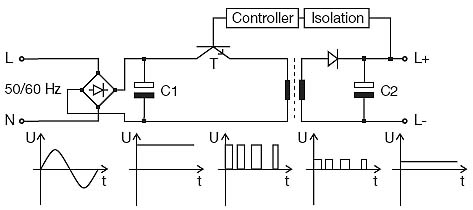
In primary switch mode power supplies, the AC mains voltage is first rectified and smoothed and then chopped ("switched"). Chopping means that the DC voltage is switched periodically at a frequency of 40 to 200 kHz using a power transistor.
In contrast to linearly regulated power supplies, the power transistor does not act as a variable resistor but as a switch instead. This generates a square-wave AC voltage that is transformed to the secondary circuit using a high-frequency transformer. In the secondary circuit, the voltage is rectifi ed and smoothed. The quantity of energy transformed to the secondary circuit is controlled, depending on the load, by varying the chopping rate. The longer the transistor is conductive, the higher is the quantity of energy transformed to the secondary circuit ( pulse width modulation).
Due to the use of high-frequency AC voltage, primary switch mode power supplies have the decisive advantage that their transformer can be of much smaller size than required for the transformation of low frequencies. This reduces the weight and the dissipation inside the unit. The effi ciency of these units is between 85 and 95 %. Since the output voltage does not directly depend on the input voltage, these units can be used for a wide input voltage range and can even be supplied with DC voltage. Furthermore, it is possible to buffer short-time mains voltage breakdowns up to 200 ms. However, the power failure buffering time is limited by the size of capacitor C1 since a longer buffering time requires a higher capacity and thus a bigger size of the capacitor. Especially in case of small power supplies this is not desirable.
Therefore, a practicable compromise has to be made between the size of the power supply and the buffering time.
Primary switch mode power supplies can be used for all purposes. For example, they are suitable for the supply of all kind of electronics as well as for electromechanical applications.
[ABB]Тематики
EN
Англо-русский словарь нормативно-технической терминологии > primary switch mode power supply
-
34 activity
1) активность
2) действенность
3) деятельность
4) производственный способ
5) радиоактивность
– activity analysis
– activity spread
– activity unit
– excluded activity
– extravehicular activity
– fermentation activity
– fission-fragment activity
– flotation activity
– included activity
– oxidative activity
– residual activity
– saturation activity
– second-order activity
– source activity
– surface activity
– tracer activity
-
35 fundamental analysis
бирж. фундаментальный анализа) фин. (анализ финансовой деятельности компании с целью выявления неправильно оцененных ценных бумаг; при таком анализе основное внимание уделяется доходам, прогнозам по дивидендам и будущим процентным ставкам, а также оценке риска компании)б) бирж. (метод прогнозирования изменения цены, основанный на анализе текущей экономической ситуации; предусматривает изучение балансов, годовых отчетов, биржевой конъюнктуры и перспектив развития отраслей экономики)See:technical analysis, economic indicator, business cycle, budget, customer demand, personal spending, consumer credit, inflation, money supply, unemployment, employment report, jobless claims, help-wanted index, productivity, factory orders, building permits, housing starts, Redbook, unit labour cost, business inventories, wholesale inventory, wholesale price index, consumer price index, Purchasing Manager Index, Consumer Confidence Index, capacity utilization, balance of trade, balance of payments, import prices, export prices, Humphrey-Hawkins testimony, event study, announcement effect, employment cost index, federal budget
* * *
фундаментальный анализ: 1) анализ экономической ситуации, основанный на изучении общеэкономических факторов типа ВВП, инфляции, процентных ставок, безработицы, товарных запасов; 2) анализ компании на основе изучения ее баланса и счета прибылей и убытков, других факторов положения компании (продукция, рынки, управление); используется для прогнозирования различных показателей, в т. ч. курсов акций, выявления их завышенности или заниженности; см. technical analysis.* * ** * *. метод прогноза изменения цены, построенный на анализе текущей экономической ситуации; анализ финансовой деятельности компании, целью которого является выявление неправильно оцененных ценных бумаг посредством анализа экономических перспектив компании. При этом основное внимание, как правило, уделяется доходам, прогнозам по дивидендам и будущим процентным ставкам, а также оценке риска компании . A method of anticipating future price movement using supply and demand information. Глоссарий финансовых и биржевых терминов . -
36 CUC
1) Военный термин: Common User Contract2) Техника: Customer Unit Cost, cask unloading cell3) Религия: Canadian Unitarian Council4) Океанография: Computer Users Committee5) Логистика: Chassis Using Charge (сбор за пользование шасси) -
37 DEA
1) Военный термин: Doctrine Evaluation Activity, data exchange annex2) Техника: deaerator, deflection error average, diethylaniline, driver evaluation assembly, dynamic electric amplifier3) Шутливое выражение: Don't Expect Anything, Dope Elite Assassins4) Юридический термин: (Drug Enforcement Agency) Администрация по контролю за соблюдением законов о наркотиках (в США), (Drug Enforcement Administration) Управление по борьбе с наркотиками (Федеральное ведомство в составе Министерства юстиции США), (Drug Enforcement Agent) сотрудник управления по борьбе с наркотиками5) Экономика: Data Envelopment Analysis анализ охвата данных6) Оптика: display electronics assemblies7) Сокращение: Data Exchange Agreement, Department of Economic Affairs, Drug Enforcement Administration, Drug Enforcement Agency (USA), Drug Enforcement Agency, Drug Enforcement Agency8) Физиология: Dog Erythrocyte Antigen9) Вычислительная техника: Drug Enforcement Agency (US Government)10) Нефть: unit a treating system using diethanolamine (DEA) for reduction of hydrogen sulphide, carbon dioxide, carbonyl sulphide and other acid gases from sour process stream11) Глоссарий компании Сахалин Энерджи: Drilling Engineering Association12) Американский английский: (Drug Enforcement Administration, US) абн13) Сетевые технологии: data encryption algorithm, алгоритм шифрования данных14) Полимеры: diethanolamine, diethylamine, differential enthalpic analysis15) Автоматика: Digital Electronic Automation16) Нефть и газ: di ethanol amine, diethanol amine, диэтаноламин (diethanol amine), ДЭА, ди-этанол-амин, диэтанол амин, диэтанол-амин17) Должность: Data Entry Assistant18) Чат: Don't Even Answer19) Аэропорты: Dera Ghazi Khan, Pakistan -
38 UL
1) Общая лексика: сверхнизкий (ultra low: e.g. UL sulphur diesel - дизтопливо со сверхнизким содержанием серы)2) Компьютерная техника: Universal Library, Unnumbered List, Unordered List, Unsorted List3) Военный термин: Ultra Loader, Unit Level4) Техника: ultralinear, upper power level, user language5) Химия: Upper Left6) Юридический термин: Unwritten Law, Used List, Utterly Legal7) Экономика: unexpected loss (неожидаемые потери)8) Бухгалтерия: upper limit9) Страхование: Underwriters Laboratories, Inc10) Телевидение: unloading11) Телекоммуникации: Underwriters Laboratory, Up Link12) Сокращение: Universal League, Unlimited, upper and lower, some international insurance institution, Underwriter’s Laboratory, university library13) Текстиль: Underwire Layer14) Университет: University of Leiden, University of Limerick (Ireland), University of Louisville (Kentucky)15) Физиология: Upper lobe16) Вычислительная техника: Underwriter Laboratories, United Linux (Linux)17) Нефть: Underwriter's Laboratories, Inc., university lands18) Транспорт: Ultra Light, Ultra Lite19) Фирменный знак: Underwriters Laboratories, United Laboratories20) СМИ: Using Linux21) Глоссарий компании Сахалин Энерджи: Underwriters' Laboratories Incorporated22) Образование: Urban Legend23) Программирование: Unsigned Long24) Автоматика: uncontrolled language25) Расширение файла: Upload26) Чат: Utterly Lazy27) Правительство: Universal Life28) НАСА: Uplink -
39 UO
1) Военный термин: Unidentified Object, Until Obsolete, Using Organization2) Техника: unit operator3) Сокращение: used on4) Университет: Ultimately Outstanding, University of Oregon5) Физиология: Undetermined origin, Urinary Output6) Электроника: Unlimited Output7) Фирменный знак: Ultima Online8) Электротехника: unplanned outage -
40 uL
1) Общая лексика: сверхнизкий (ultra low: e.g. UL sulphur diesel - дизтопливо со сверхнизким содержанием серы)2) Компьютерная техника: Universal Library, Unnumbered List, Unordered List, Unsorted List3) Военный термин: Ultra Loader, Unit Level4) Техника: ultralinear, upper power level, user language5) Химия: Upper Left6) Юридический термин: Unwritten Law, Used List, Utterly Legal7) Экономика: unexpected loss (неожидаемые потери)8) Бухгалтерия: upper limit9) Страхование: Underwriters Laboratories, Inc10) Телевидение: unloading11) Телекоммуникации: Underwriters Laboratory, Up Link12) Сокращение: Universal League, Unlimited, upper and lower, some international insurance institution, Underwriter’s Laboratory, university library13) Текстиль: Underwire Layer14) Университет: University of Leiden, University of Limerick (Ireland), University of Louisville (Kentucky)15) Физиология: Upper lobe16) Вычислительная техника: Underwriter Laboratories, United Linux (Linux)17) Нефть: Underwriter's Laboratories, Inc., university lands18) Транспорт: Ultra Light, Ultra Lite19) Фирменный знак: Underwriters Laboratories, United Laboratories20) СМИ: Using Linux21) Глоссарий компании Сахалин Энерджи: Underwriters' Laboratories Incorporated22) Образование: Urban Legend23) Программирование: Unsigned Long24) Автоматика: uncontrolled language25) Расширение файла: Upload26) Чат: Utterly Lazy27) Правительство: Universal Life28) НАСА: Uplink
См. также в других словарях:
Unit Valuation System — The Unit Valuation System (UVS) was developed by Mutual Funds and Unit Trusts, as a means of determining fund performance in an environment where there are frequent cash contributions and withdrawals. The UVS is commonly used by Investment Clubs… … Wikipedia
Unit-weighted regression — In statistics, unit weighted regression is perhaps the easiest form of multiple regression analysis, a method in which two or more variables are used to predict the value of an outcome. At a conceptual level, the example of weight loss can… … Wikipedia
Unit identification aircraft markings — Unit identification aircraft markings, commonly called tail markings after their most frequent location, were numbers, letters, geometric symbols, and colors painted onto the tails (vertical stabilizer fins), wings, or fuselages of the combat… … Wikipedia
Unit 731 — The Unit 731 complex Location Pingfang Coordinates … Wikipedia
Unit propagation — (UP) or the one literal rule (OLR) is a procedure of automated theorem proving that can simplify a set of (usually propositional) clauses.DefinitionThe procedure is based on unit clauses, i.e. clauses that are composed of a single literal. If a… … Wikipedia
Unit 8200 — installation on Mount Avital Unit 8200 (Hebrew: יחידה 8200, Yehida Shmoneh Matayim) is an Israeli Intelligence Corps unit responsible for collecting signal intelligence and code decryption. It also appears in military publications as the Central … Wikipedia
Unit pump — Unit pumps on Mack s E7 diesel engine The Unit Pump system [1] is a modular high pressure diesel injection system, which is closely related to the Unit Injector system UI, and is designed for use in commercial vehicle diesel engines … Wikipedia
Unit 326 — was an Albanian special forces group. It consisted of approximately 600 members. Its duties included counter terrorism, riot control, search and rescue, and demolition. In some respect its duties were reminiscent of the British SAS. After 1991… … Wikipedia
Unit record equipment — Before the advent of electronic computers, data processing was performed using electromechanical devices called unit record equipment, electric accounting machines (EAM) or tabulating machines. Unit record machines were as ubiquitous in industry… … Wikipedia
Unit testing — In computer programming, unit testing is a method by which individual units of source code are tested to determine if they are fit for use. A unit is the smallest testable part of an application. In procedural programming a unit may be an… … Wikipedia
Unit vector — In mathematics, a unit vector in a normed vector space is a vector (often a spatial vector) whose length is 1 (the unit length). A unit vector is often denoted by a lowercase letter with a hat , like this: (pronounced i hat ). In Euclidean space … Wikipedia
